

A budget is a fantastic tool that is used for tracing income and expenses. It helps millions of individuals and businesses determine whether they are spending more or less than what they earn which in turns, makes it easier to identify areas that need improvement. Read on to learn how to make a budget and adjust your spending habits to keep within your budget.
How to Make a Budget
If you have never created a budget before, then this is a great place to start. The first step is deciding on what type of budget planning tools you want to use – a pen and paper or an electronic spreadsheet. The advantage of using a program such as Excel is that it can automatically perform the calculations for you.
Creating a Spreadsheet
The easiest way to make a budget is to create a spreadsheet with two columns – the left column labelled Income and the right Expenses.
Then, under the Income column, list all sources of income that you receive. If you are creating a family budget, include their income in this column as well. Clearly identify each entry so that your spreadsheet remains easy to read.
After entered all the details, create a line below and record the total income.
To complete the expenses column, follow the same steps. Include all expected and actual expenses, no matter how small they are. For those expenses that you are unsure of, record them under a miscellaneous category.
Again, after entering all the expenses, create a line below and record the total expenses.
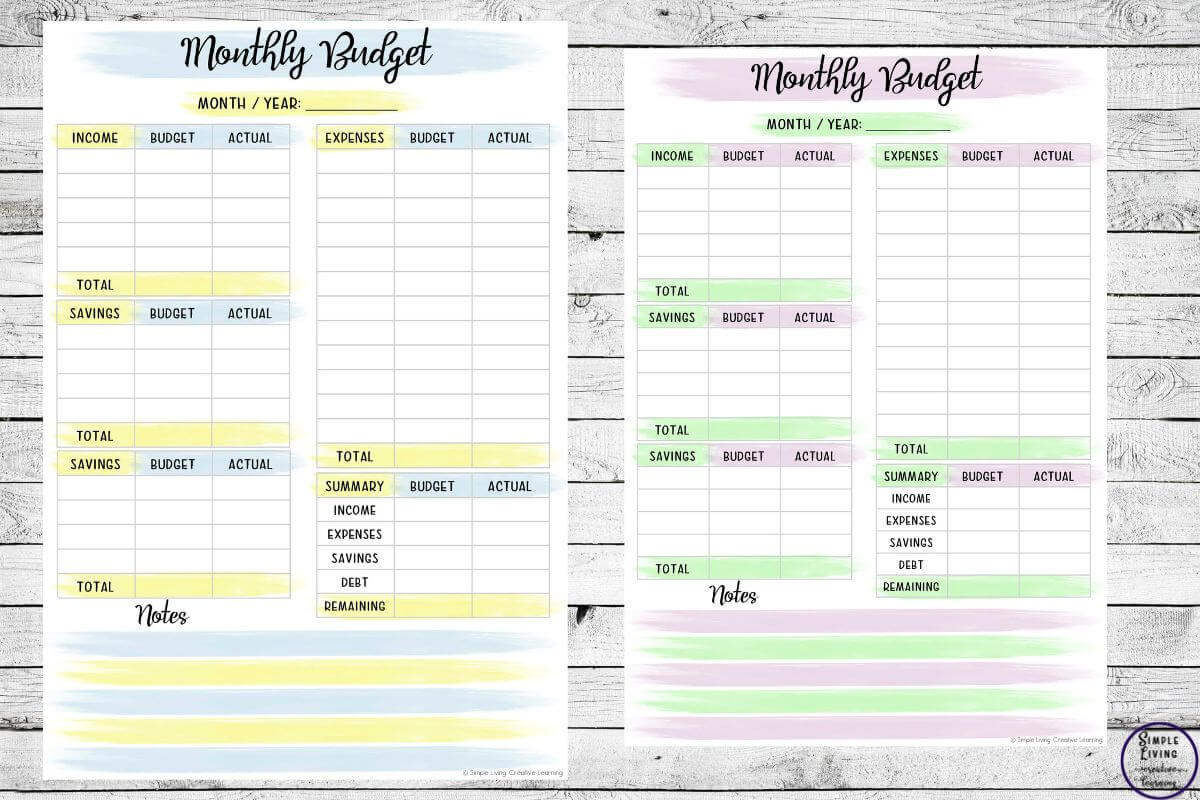
Below all of this, create and record a Net Result. Calculate this by subtracting the total expenses from the total income. A positive number indicates the amount of money left over after paying all the expenses.
If the result is negative, you will need to either reduce your expenses or increase your income or both to maintain a balanced budget.
Creating a budget is a straightforward process. Maintaining one consistently can provide valuable insight into your financial healthier and help you make informed financial decisions.
To grab a copy of this printable Budget Monthly Planner, sign up below:
This post is great for those who want to teach their children financial responsibility from a young age.
No-Spend Month Challenge
Once you have created a budget and understand where your money is going, consider trialling a No-Spend Month. This is a great way to save money, clean out your pantry, fridges and freezers and avoid all non-essential spending for an entire month. Though, you will continue to pay the necessary bills such as housing, utilities, transport, insurance and groceries.
To complete a No-Spend Month Challenge, choose the month you will complete the challenge so you can be prepared for it. Start the challenge on the first day of the month, and spend the time focusing on what you already have, finding free entertainment, cooking meals at home and avoiding any impulse purchases. Use this month to identify unnecessary spending habits while building your savings and overall, becoming more intentional with your financial decisions.
To make this challenge easier, and to help you stay on track, some printable tracking sheets which you could use include:
- A No-Spend Month calendar to mark off each successful day.
- A Savings Tracker to record the money you didn’t spend.
- A daily spending log for essential purchases.
- A meal planner to help reduce grocery costs and food waste.
- A habit tracker to monitor goals such as making coffee at home or bringing your lunch to work.
- A reflection worksheet to record what you learned and plans for improving the next time you complete the challenge.
This post on easy ways to save on food may also be of interest to you.

At the end of the month, compare your results with your original budget. It may be surprising to see how much you were able to save and the spending habits that were different during the challenge.
Even if you don’t complete the perfect no-spend month, the challenge will provide valuable insight into your finances and help you develop healthier long-term money management habits.
To grab a copy of this No Spend Challenge, sign up below:
 Strawberry Life Cycle Printables